
Custom 404 errors can significantly impact a website’s performance and user experience. They occur when a visitor lands on a URL that doesn’t exist, but instead of displaying a generic error page, the website presents a branded and helpful alternative. Custom 404 error pages can either make or break a user’s journey. We will discuss how to find out, fix errors, and others.
What is a 404 Error?
A 404 error (Not Found) means that the server cannot find the requested page. When a user tries to access a page that doesn’t exist or has been moved without updating the link, the 404 error is triggered. Websites usually display a standard 404 page, but creating a custom 404 error page can be more effective in retaining visitors.
Common Causes of 404 Errors
Several reasons can lead to a 404 error:
- The page was deleted or moved without updating the link.
- Incorrect URL entered by the user.
- Broken internal links.
- Issues with the domain name or DNS settings.
Understanding these causes will help you quickly address the issue and ensure that users have a smooth experience on your website.
Why Fixing 404 Errors is Important
Fixing 404 errors is important for several reasons:
- Improves User Experience: Visitors can become frustrated if they can’t find what they’re looking for, leading them to leave your site.
- SEO Impact: 404 errors can negatively affect your site’s SEO ranking. Search engines like Google crawl your pages and take note of any 404 errors. Too many 404 errors can result in a drop in your search engine rankings.
- Preserves Traffic: A custom 404 error page can help retain visitors by offering them alternative content or guiding them back to working pages.
How to Create a Custom 404 Error Page
Before fixing the error itself, it’s important to have a custom 404 page that guides users. A custom 404 page can display a message telling the visitor that the page they’re looking for doesn’t exist, while also providing helpful links or a search bar.
Steps to Create a Custom 404 Page
- Design a Simple Layout: Make sure your 404 page is clear and easy to understand. Include a message like “Oops! Page not found” or “We couldn’t find the page you’re looking for.”
- Provide Links to Useful Pages: Suggest popular pages such as your homepage, product pages, or blog.
- Include a Search Bar: A search bar will help users find what they need without leaving your site.
- Maintain Consistent Branding: Ensure that the 404 page matches the rest of your website design to make the experience less jarring.
- Add humor or personality: Sometimes, adding a touch of humor can help improve the experience and leave a positive impression.
Fixing Custom 404 Errors: Step-by-Step Guide
Here’s how you can identify and fix 404 errors:
1. Use Google Search Console
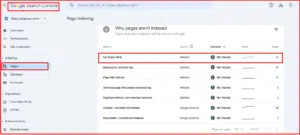
Google Search Console is a free tool that helps you identify broken links and 404 errors on your website.
- Step 1: Log in to Google Search Console.
- Step 2: Go to the “Coverage” section, where you’ll find a list of 404 errors.
- Step 3: Download the list of errors and start reviewing each one.
2. Check for Broken Links
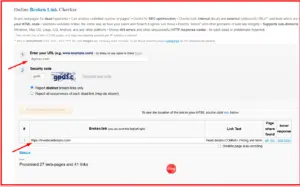
Broken links are a common cause of 404 errors. These occur when you link to a page that has been deleted or moved.
- Use tools like Screaming Frog or Ahrefs to scan your website for broken links.
- Review your website’s internal and external links to make sure they are all functional.
- Update or remove any broken links.
3. Redirect Missing Pages
If a page has been permanently removed, the best way to handle it is by setting up a 301 redirect to guide visitors to a new or related page. This will ensure that anyone trying to access the old page is automatically redirected.
- Use a 301 redirect for permanent changes.
- Use a 302 redirect for temporary changes. Setting up redirects can prevent users from seeing the 404 error while still guiding them to relevant content.
4. Correct Typos in URLs
Sometimes, 404 errors occur because of small mistakes in the URL. Double-check to ensure that URLs in your links are accurate. Make sure that capitalization, hyphens, and special characters are correctly used.
5. Fix DNS Issues
Sometimes, DNS issues can cause 404 errors. Make sure your domain settings are correct. If you’ve recently moved your website to a new server or changed hosting providers, double-check that your DNS records are pointing to the correct IP address.
6. Check Server Configuration
Server issues can also lead to 404 errors. Review your server configuration file (such as .htaccess for Apache servers orweb.config for IIS servers) to ensure that there are no misconfigurations causing the errors.
Using Tools to Monitor 404 Errors
Several tools can help you identify and monitor 404 errors on your website. These include:
- Google Search Console: Great for identifying issues directly from a Google Search Console perspective.
- Screaming Frog: A powerful website crawler that can find broken links with S. frog.
- Ahrefs: Another SEO tool that helps find broken links and pages with 404 errors.
- Dead Link Checker: A simple tool that scans your website for broken links. Regular monitoring of your website using these tools will help you catch 404 errors before they impact your traffic.
Best Practices for Handling 404 Errors
To ensure that 404 errors don’t negatively impact your website, follow these best practices:
- Regular Audits: Regularly check your site for broken links and missing pages using SEO tools.
- Use 301 Redirects: Whenever you remove or move a page, set up a 301 redirect to point users to the new location.
- Create a User-Friendly 404 Page: Make sure your 404 page provides helpful information and easy navigation back to other parts of your site.
- Track Changes: If you make changes to your website, always keep track of the pages you add or remove, and update any internal links accordingly.
Benefits of Addressing 404 Errors
Fixing 404 errors yields several advantages:
- Improved User Experience: Visitors are more likely to stay and engage with the site.
- SEO Benefits: Reducing broken links can positively impact search engine rankings.
- Enhanced Brand Reputation: A functional, error-free website builds trust and credibility.
- Increased Conversions: Ensuring a smooth user journey leads to higher conversions.
- Lower Bounce Rates: Users are less likely to leave your site when they find what they need.
Why Partner with Digiluxo for Custom 404 Solutions?
At Digiluxo, we specialize in crafting custom 404 error solutions tailored to your website’s needs. Our expertise ensures that no visitor feels lost and every potential lead stays engaged.
- Comprehensive Audits: We identify all broken links and missing pages.
- Custom Page Design: Our designs reflect your brand while offering maximum usability.
- Advanced Redirects: We implement 301 redirects to maintain your SEO rankings.
- Continuous Monitoring: Ongoing checks to keep your site error-free.
- SEO Optimization: We ensure that fixing errors boosts your website’s performance.
Recommended by Technical SEO Specialist
- Barry Adams: Barry Adams is a renowned SEO consultant with years of experience. He specializes in technical SEO and is the founder of Polemic Digital. Barry is an active speaker at SEO conferences worldwide.
- Aleyda Solis is an award-winning SEO consultant and the founder of Orainti. She is an expert in international SEO and technical optimization. Aleyda frequently shares her knowledge through blogs and webinars.
- Firoz Ahmad: Firoz Ahmad is a distinguished SEO expert based in Dhaka, Bangladesh, with a robust background in digital marketing and web development. He specializes in various facets of SEO, including keyword research, link-building, on-page optimization, content strategy, and analytics reporting.
Conclusion
404 errors can be frustrating for both users and website owners. However, by creating a custom 404 page, monitoring your website for errors, and fixing broken links and redirects, you can minimize the negative impact on user experience and SEO. Keep your website healthy by regularly checking for issues, using tools like Google Search Console, and applying best practices to keep visitors on your site.